Suppressing a Security Vulnerability at the Global Level
The System Administrator can suppress a security vulnerability at the global level for one or more (or all) component versions associated with the vulnerability.
Effects of Suppressing a Security Vulnerability Globally
Once a vulnerability is suppressed for one or more component versions at the global level, it is no longer visible in the Code Insight user interface or counted in vulnerability totals across Code Insight. The count reduction is evident on the dashboard for each project containing inventory associated with the suppressed vulnerability. The Vulnerabilities bar graphs in the user interface, as well as in subsequently generated API responses and reports (Project and Audit), do not reflect the suppressed vulnerability.
Likewise, the actual vulnerability is no longer visible in the list of vulnerabilities on the Security Vulnerabilities window (which is opened when you click a Vulnerabilities bar graph). However, you can view the suppressed vulnerability on the Global subtab of the Suppressed Vulnerabilities tab on the Data Library page (see Viewing Security Vulnerabilities Associated with One or More Component Versions at the Global Level).
The following describes the additional impact that a security vulnerability globally suppressed for one or more component versions has on other features across projects in Code Insight:
-
Advanced Search on the Analysis Workbench, Project Inventory tab and Inventory View—When an inventory search is based the vulnerability name or severity, the results do not include any inventory item associated with the component version for which the vulnerability is suppressed.
-
Alerts—Any open alerts for the suppressed vulnerability are automatically closed, and the open and closed alert counts are adjusted on the Project Inventory tab, in the Analysis Workbench, and on the Inventory view.
noteIf, after suppressing a vulnerability globally, you want to change the status or priority of the alert for an impacted inventory item in a given project see Working with Security Vulnerabilities.
-
Policies—Once a security vulnerability is suppressed, no changes are initially propagated to those review policies that are based on vulnerabilities. However, each time one of these policies is triggered thereafter (that is, when an inventory item is published), the policy ignores the suppressed vulnerability when determining whether to automatically approve or reject the published inventory item.
infoA change in policy due to the suppression of a vulnerability does not change the existing approval/rejection status of a published inventory item unless the item is manually recalled and then republished.
-
Subsequent scans and rescans—Once a vulnerability is suppressed, it is no longer reflected in the results of subsequent rescans and initial scans, whether incremental or full, across projects.
-
Vulnerability currently suppressed at project level now included in a global suppression—If a vulnerability suppressed at the project level is now included in a global-level suppression of the vulnerability, it is removed from the Project subtab and added to the Global subtab of the Suppressed Vulnerabilities tab on the Data Library page. In other words, the vulnerability remains suppressed for the specified component version in the project. However, it has been unsuppressed at the project level (and its exclusion analysis is deleted) and is now suppressed at the global level along with all other inventory associated with this same component version across projects in Code Insight.
Suppress a Security Vulnerability Globally
The following procedure is used to suppress a security vulnerability for one or more (or all) versions of an OSS or third-party component associated with your inventory.
To suppress a security vulnerability globally, do the following:
-
As a System Administrator, locate the Vulnerabilities bar graph within the context of a given component version (or inventory item) associated with the vulnerability you want to suppress. You can use the bar graph found in any of the locations described in Contexts for the Vulnerabilities Bar Graph.
noteThe bar graph is visible only if vulnerabilities exist for the component version.
-
Click anywhere on the Vulnerabilities bar graph.
-
The Security Vulnerabilities window is displayed, showing the list of vulnerabilities associated with the component version or inventory item.
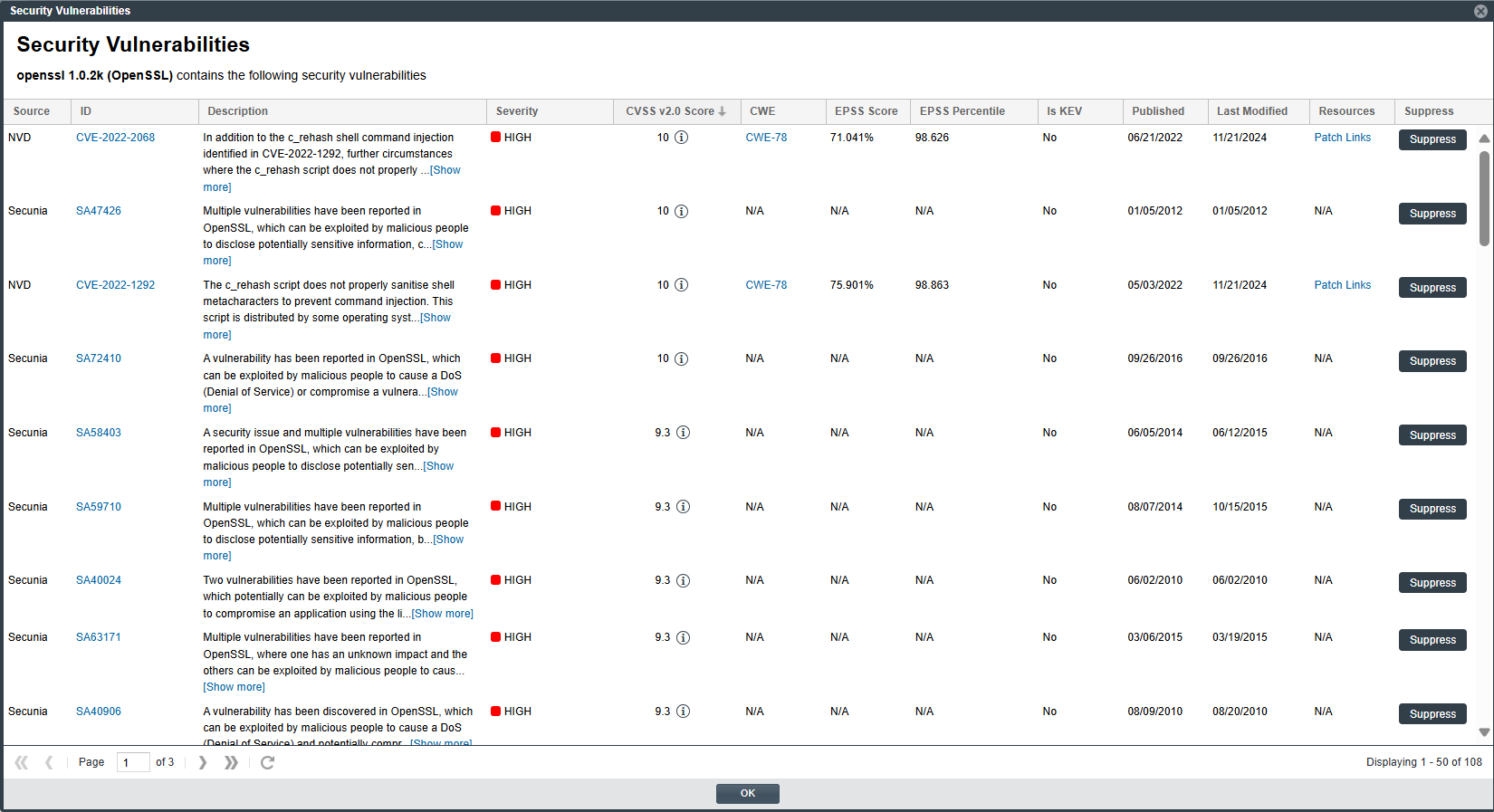
noteIf you opened Security Vulnerabilities window from the bar graph in the Inventory Details pane/tab for a given inventory item in the Analysis Workbench or Project Inventory tab, the Suppress column is replaced with an Analyze column showing an Analyze button for each vulnerability. Both buttons give you access to functionality to suppress a vulnerability globally.
-
-
Locate the security vulnerability that you want to suppress, and click its corresponding Suppress (or Analyze) button. The Suppress Vulnerability window is displayed (or, if you clicked Analyze, the Analyze and Suppress Vulnerability window is displayed.).
-
If the Analyze and Suppress Vulnerability window is displayed, proceed to the next step.
-
If the Suppress Vulnerability window is displayed (as shown below), skip to step 5.
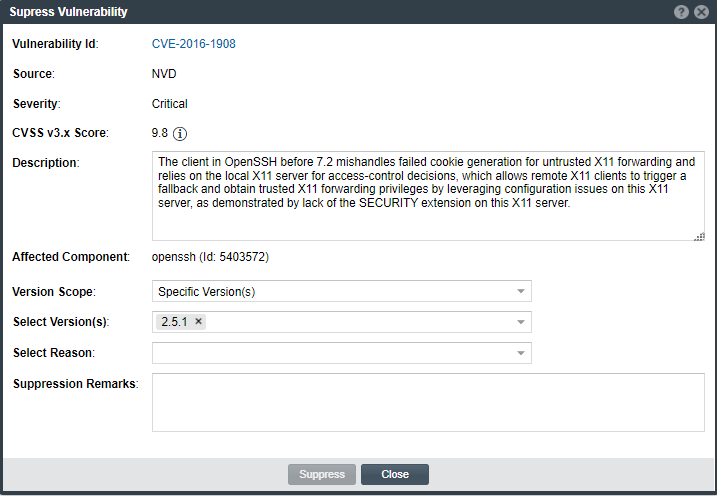
-
-
(For only the Analyze and Suppress Vulnerability window) Select Global for the Suppression Scope field. The window is automatically refreshed to show the fields for a global suppression. Continue with step 5.
-
On either the Suppress Vulnerability window or the Analyze and Suppress Vulnerability window, complete all editable fields on the window to define the vulnerability suppression at the global level. For a description of these fields, see Suppress Vulnerability Window or the Fields for Suppressing a Vulnerability at the Global Level topic in the “Analyze or Suppress Vulnerability Window” topic.
-
Click Suppress. Then click OK in the pop-up to acknowledge that the vulnerability has been successfully suppressed for the specified component versions.
You are returned to the Security Vulnerabilities window, which no longer lists the suppressed vulnerability. However, if no vulnerabilities remain for the component version on the window, you are returned to the context from which you opened the Security Vulnerabilities window (for example, the Lookup Component window or the Inventory Details tab). The Vulnerabilities bar graph count at this location should be reduced because of the suppressed vulnerability.
In general, a vulnerability that is globally suppressed vulnerability should no longer be reflected in vulnerability counts or be visible for the specified component versions in component lookups or for inventory associated with these versions across all projects. For a description of additional impact of globally suppressing a vulnerability, see Effects of Suppressing a Security Vulnerability Globally.
Using REST API to Suppress a Vulnerability Globally
A System Administrator can also suppress a security vulnerability using the Suppress vulnerability REST API. For more information about this API, see the Code Insight Swagger documentation, available from the Help > REST API Guide option on the Code Insight menu. (To access this menu, click the  icon in the upper right corner of the Code Insight web page.)